macOS app · Go + Wails
See exactly what a branch changes
git-tree-compare shows you the preview of your pull request, file by file, on your own machine — no browser needed.
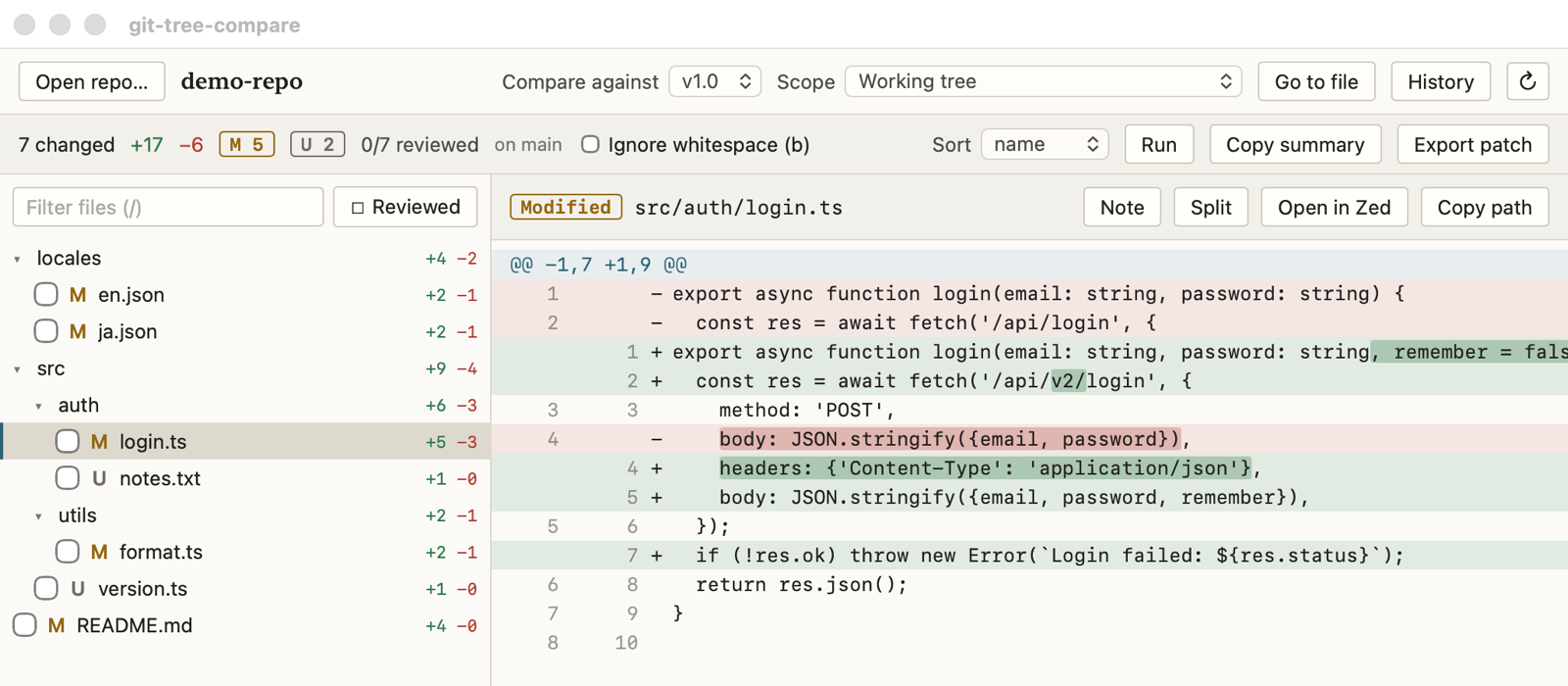
What you get
A tree, not a wall of files
Changed files sit in their real folders with status, added and removed line counts, and a filter box.
A diff you can actually read
Split or unified, optional whitespace ignore, and hunk navigation with [ and ].
Review at your own pace
Tick files as reviewed one by one or in batches, keep a note per file, then sync the ticks to GitHub.
PR comments under their lines
When your branch has an open pull request, review threads show up under the line they were left on. Comments stay read-only.
Warned before you conflict
If a file would clash with the base, the app says so before you merge — and can revert it to the base version.
Terminal and history built in
Run a command such as tests against the changed files, open a terminal in the repo, and browse past comparisons.
Open a repo, pick the base, read the diff
Pick what to compare against — a branch, tag or remote branch. It defaults to the pull request base.
Choose Working tree to include your uncommitted changes, or a single commit.
Click a file to read its diff, tick what you have reviewed, then export a summary or a .patch.
Your hands stay on the keyboard
Press ? inside the app for the full list.
Runs on what you already have
- macOS, with git on your PATH
- GitHub CLI (gh) logged in — for pull request features and update checks
- Zed, only if you want "Open in Zed" (optional)
Two minutes
- Download the latest zip from the Releases page.
- Unzip it and move git-tree-compare.app to /Applications.
- Open it. If macOS blocks it the first time, right-click the app and choose Open.
Every release ships with a sha256 checksum. The app tells you when a newer build exists and installs it in place.